How to Find an LEI: Using the GLEIF LEI Lookup (Step-by-Step)
If you need to verify a Legal Entity Identifier, the fastest place to start is the official GLEIF LEI lookup. It is public, free to use, and built for one practical purpose: helping anyone confirm whether a legal entity already has an LEI and whether that LEI record is current.
That matters for Canadian corporations, funds, trusts, charities, pension structures, and other entities that may need an LEI before trading, reporting, or completing certain financial transactions.
The official source is the Global Legal Entity Identifier Foundation, usually shortened to GLEIF. Its Global LEI Index acts as the central public database for LEI records, including active and historical data. If you are checking an entity before applying for a new LEI, renewing an existing one, or reviewing counterparties, this is the place to begin.
What the GLEIF LEI lookup tool does
The GLEIF LEI lookup tool lets you search the Global LEI Index by legal entity name, LEI code, and other reference data. You do not need an account, and there is no fee to search.
In practical terms, that means you can use it to answer a few key questions very quickly:
- Does this entity already have an LEI?
- Is the LEI active, lapsed, or in another registration status?
- Does the legal name in the record match the entity you expect?
- What address, jurisdiction, or registration details appear in the record?
- Is there parent or ownership information available?
This is especially helpful before starting a new LEI application. Since one legal entity should have only one LEI, a quick search can prevent duplicate applications and the delays that come with them.
Where to access the official GLEIF LEI lookup
The official website is https://www.gleif.org.
From there, you can go to the LEI Data section and open LEI Search. GLEIF also provides guidance pages explaining how the search tool works, including quick search, filters, expert mode, and data exports.
If you only remember one thing, remember this: use the GLEIF site when you want the authoritative public record.
Step-by-step process to find an LEI in GLEIF
The search process is simple, even if you have never used the tool before.
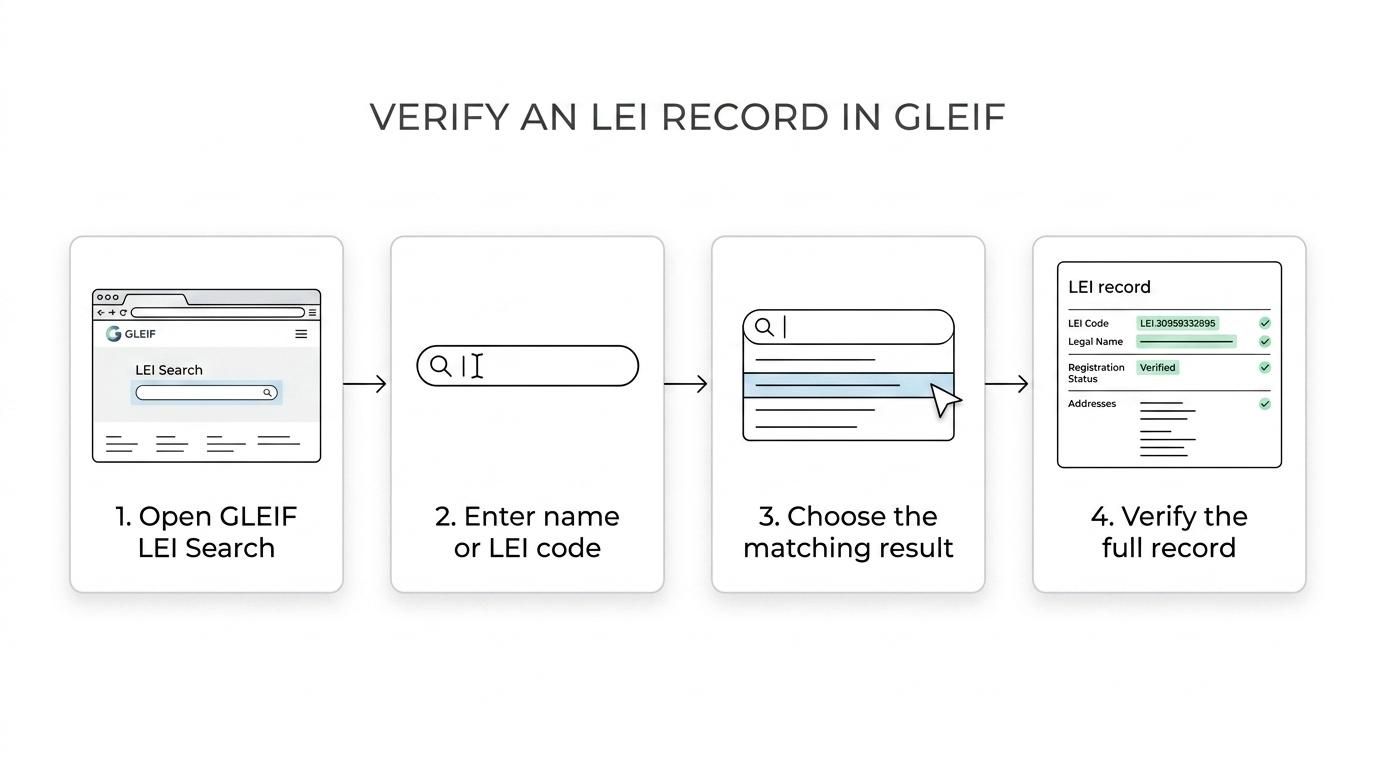
- Go to the GLEIF website and open the LEI Search page.
- Locate the Quick Search field near the top of the interface.
- Enter either the full legal name, a partial legal name, or the exact 20-character LEI code.
- Review the suggestions that appear while you type.
- Open the matching result from the results list.
- Check the detail page for registration status, legal name, addresses, dates, and any available ownership data.
If you know the LEI code already, use that first. It is the most direct route to the exact record.
If you only know part of the entity name, start broad and refine the results once they appear.
How the GLEIF LEI search interface works
The search screen is designed for two kinds of users: people who want a quick answer and people who need a narrower query.
In its default setup, the tool uses a simple search mode. You type into the Quick Search field, and the system searches across LEI records. As you type, you may see suggested matches, and GLEIF also supports typo assistance through “Did you mean...?” suggestions.
There is also an expert mode. This is useful when a name is common, when several related entities share similar names, or when you want to narrow results using specific fields and operators.
A typical search flow looks like this:
| Search feature | What it helps you do |
|---|---|
| Quick Search | Search by legal name, partial name, LEI code, and other indexed record data |
| Suggestions | Surface likely matches while you type |
| Country filter | Narrow results by jurisdiction or country |
| General Category filter | Refine by entity grouping |
| Status filter | Focus on a particular registration status |
| Expert mode | Build more specific queries using selected fields and logic |
| Detail page | Open the full LEI record with labelled data fields |
| Change History | Review recorded updates to the entity data |
That combination makes the tool useful for both one-off checks and more disciplined compliance review.
Best search methods for finding the correct LEI record
A broad search can produce a long list of similar names, especially with multinational groups, funds, and entities using common terms like “Holdings,” “Capital,” or “Trust.” A better search method can save time.
A few habits make a real difference:
- Exact LEI code
- Full legal entity name
- Country filter
- Registration status check
When the name is common, add the country filter early. When punctuation or abbreviations vary, try the suggestions offered by the tool rather than forcing one spelling. If you are searching for a fund or special purpose vehicle, watch closely for minor differences in legal suffixes and registered address details.
How to read the GLEIF LEI lookup results
Once you submit a search, GLEIF shows a results table with a short set of fields. This view is built to help you confirm whether you are opening the right record before moving to the full detail page.
You will typically see the country, entity status, legal name, LEI, and registration status. Those fields tell you a lot right away.
Here is a practical way to read them:
- Legal Name: Confirm the formal registered name, not just a trading name or internal abbreviation.
- LEI: Check the full 20-character code if you need an exact identifier for trading or reporting.
- Country: Use this to separate entities with similar names in different jurisdictions.
- Registration Status: Review whether the record appears current or whether renewal may be needed.
- Entity Status: Confirm that the entity itself is in the expected state within the record.
If you are validating an LEI before a transaction, do not stop at the search result line. Open the detail page and confirm the data there.
What information appears on an LEI detail page
The detail page is where the lookup becomes genuinely useful. GLEIF maps the reference data into readable field names, so you can inspect more than just the identifier itself.
Depending on the record, you may find the legal name, registered address, headquarters address, jurisdiction of formation, legal form, registration authority details, creation date, renewal or expiry timing, and related status fields. Some records also include relationship data, which points to parent entities or ownership structures where reported.
GLEIF also offers a permanent URL for the record, which helps when sharing a verified link internally with legal, trading, compliance, operations, or counterparties.
One more strong feature is the Change History tab. This allows users to review changes to reference data over time, which can be useful if an entity has changed name, address, or other recorded information.
Using GLEIF LEI lookup for ownership and relationship checks
The Global LEI Index is not only about “who is who.” It also supports Level 2 data, often described as “who owns whom.”
For some users, this is the most valuable part of the search tool. It can help with group structure reviews, counterparty screening, and corporate record validation.
GLEIF supports relationship searches in ways that can include:
- Who owns...?: Search upward toward parent entities.
- Who is owned by...?: Search downward to identify children or controlled entities.
- Ultimate Parent: Review the top-level reported parent in a structure.
- Direct Parent: Check the immediate parent where reported.
- Children: Look for direct or ultimate child entities tied to the record.
Not every entity will have full relationship data available. Reporting exceptions exist, and some structures do not produce a parent record in the database. Still, when the data is there, it adds a deeper layer of clarity than a basic identifier search alone.
Exporting data from the GLEIF LEI search results
GLEIF also lets users export search results. This is useful for teams working with multiple entities, audit files, onboarding reviews, or internal controls.
Available export formats include Excel, CSV, JSON, and XML. If the result set is modest, you can download the full result list directly. Very large result sets are handled differently, and GLEIF also makes bulk data available through other services, including Golden Copy files and an API.
That means the lookup tool works well both for individual checks and for larger operational use cases.
Common reasons an LEI search does not return the expected result
Sometimes the entity you want does not appear immediately. That does not always mean the LEI is missing.
A few common causes include spelling differences, punctuation differences, use of abbreviations, legal suffix variations, recent updates not yet reflected in your internal records, or searching for a parent company when the LEI sits with a different legal entity in the structure.
If your first search fails, try these adjustments:
- Search the exact LEI code if any internal file contains it
- Remove punctuation or shorten the name
- Add the country filter
- Try the formal registered name instead of the operating name
- Review whether the entity might be a subsidiary, fund, or trust with a different legal name
A short second search often solves the issue.
GLEIF LEI lookup versus an LEI registration service
GLEIF is the official public source for LEI data. It is the right place to verify whether an LEI exists and to inspect the underlying record.
A registration service has a different role. It helps legal entities obtain a new LEI, renew an existing one, or transfer an LEI from another provider for ongoing management and support.
That distinction matters in practice:
| Need | Best starting point |
|---|---|
| Verify whether an LEI exists | GLEIF LEI lookup |
| Check registration status or record details | GLEIF LEI lookup |
| Apply for a new LEI | Registration agent or issuing partner |
| Renew an LEI before lapse | Registration agent or issuing partner |
| Transfer and renew an LEI | Registration agent or issuing partner |
| Get help with forms and entity data | Registration agent support |
For Canadian entities, this usually means starting with GLEIF to confirm the record, then moving to a service provider if action is needed.
What to do after you find the LEI
Once you locate the record, the next step depends on what you see.
If the LEI is current and the data is correct, you may simply save the code and the permanent record link for your files. If the record exists but the registration status shows that renewal is needed, renewal should be handled promptly to keep the record current. If no LEI exists, you can move ahead with a new registration.
That is where support can be useful, especially when the entity structure is complex or the applicant needs a quick turnaround. Some registration agents serving Canada can help with new registrations, renewals, and transfers, while also checking GLEIF data to avoid duplicates. LEI Service, for example, offers registration, renewal, transfer and renewal, automated lookup checks, and support by phone or email for Canadian entities that need help moving from search to action.
For teams that handle multiple entities, a managed process can also reduce the risk of missed renewals and outdated reference data.
A practical LEI lookup habit for Canadian businesses
A smart routine is simple: check GLEIF first, act second.
That one habit can prevent duplicate applications, reduce confusion across similar entity names, and give your team a clean record of the identifier actually tied to the legal entity. It also supports stronger onboarding, trading readiness, and internal control over entity data.
For many organisations, the LEI lookup takes only a few minutes. The value of getting it right can last much longer.